Clone Files Checker 6.1 Free Key – Delete Duplicate Files
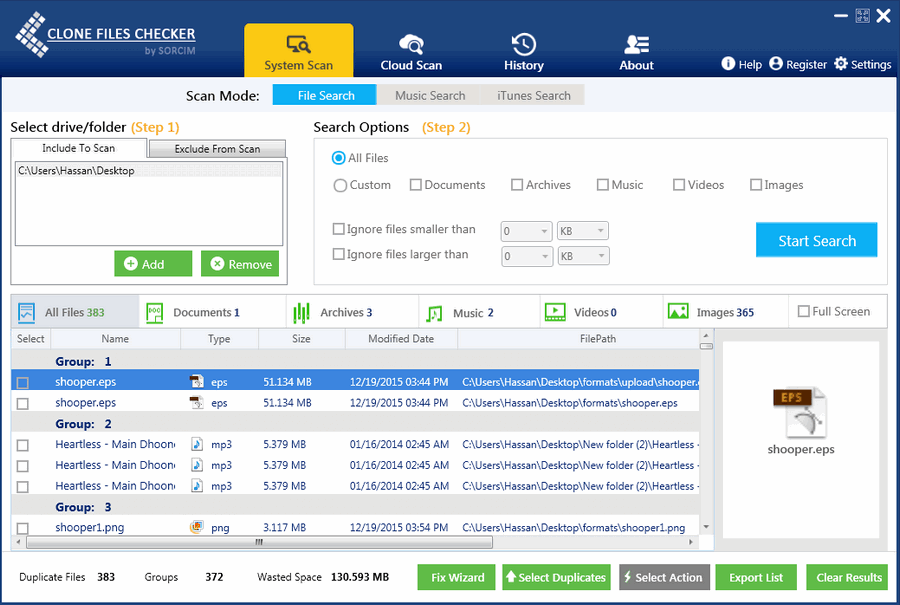
Table of Contents (5 min read)
Managing Storage Sprawl: Duplicate File Remediation Across Homelab & Windows Storage
Operating multi-terabyte homelab storage arrays—whether running on a Dell PowerEdge T20 server under Proxmox VE, an OpenMediaVault (OMV) NAS appliance, or enterprise Windows Server file clusters—inevitably leads to storage bloat. Between automated download pipelines (Sonarr, Radarr, Prowlarr), media libraries (Plex, Emby, Audiobookshelf), ISO repositories, and workstation system backups, redundant data silently consumes hundreds of gigabytes of expensive high-speed storage.
While enterprise filesystems like ZFS offer inline block-level deduplication, the RAM overhead (often requiring 5 GB of ECC memory per 1 TB of deduplicated pool storage) is rarely practical for homelab environments. Instead, file-level hash deduplication and targeted utilities like Clone Files Checker provide an efficient, non-destructive method to audit and reclaim storage without destabilizing disk I/O.
1. Storage Architecture: Where Duplicate Files Accumulate
In our DenverNerd homelab environment, storage is partitioned into dedicated tiers:
| Storage Tier | Underlying Platform | Filesystem / Protocol | Common Duplicate Sources |
|---|---|---|---|
| Media Pool | OpenMediaVault 7 (OMV) | Ext4 / MergerFS + SnapRAID | Sonarr/Radarr downloads, misconfigured hardlinks |
| Enterprise Shares | Windows Server 2022 VM | NTFS / ReFS via SMB3 | Duplicate documentation, workstation backups, VHDx images |
| VM & Container Disks | Proxmox VE (PVE 8) | ZFS Mirror (Enterprise NVMe) | Redundant container templates, base Debian cloud-init images |
| Local Workstation | Windows 11 Pro | ReFS Fast-Clone / NVMe | Staged 3D CAD models (.STL, .STEP), video project scraps |
When files are duplicated across SMB shares, traditional file browsers make identification nearly impossible. An automated tool must calculate cryptographic checksums (MD5, SHA-256, or byte-by-byte comparison) rather than relying merely on file names or timestamps.
2. Clone Files Checker 6.1: Capabilities & Workflow
Clone Files Checker provides a dedicated desktop scanning engine engineered for Windows environments. It scans local drives, mapped network drives (SMB shares), and external storage to identify true binary duplicates regardless of filename differences.
Key Capabilities
- Multi-Algorithm Checksums: Performs CRC32, MD5, and SHA-256 hashes to eliminate false positives.
- Custom Filter Modules: Restrict scans to specific file extensions (e.g., video
.mkv,.mp4; audio.flac,.mp3; 3D models.stl,.3mf,.step; archives.zip,.tar.gz). - Safety Quarantine: Rather than immediately executing permanent deletion, files can be moved to a designated staging quarantine folder or compressed into a rollback ZIP archive.
- Exclusion Profiles: Allows sysadmins to whitelist critical system paths (
C:\Windows,C:\Program Files, active database directories) to prevent accidental OS corruption.
To download Clone Files Checker, visit their official portal at https://www.clonefileschecker.com/.
Registration Walkthrough
To activate the free registration key, review the step-by-step walkthrough in the embedded video:
3. Advanced SysAdmin Automation: PowerShell Hash Deduplication
For headless Windows Server administration or scheduled background maintenance across network shares, GUI applications aren't always ideal. You can perform precise duplicate auditing directly via PowerShell:
# Audit-DuplicateFiles.ps1
# Discovers binary duplicates based on SHA-256 hashes across SMB shares

param(
    [Parameter(Mandatory=$true)]
    [string]$TargetFolder,
    [int64]$MinSizeBytes = 10485760 # 10 MB minimum
)

Write-Host "Scanning '$TargetFolder' for files >= $($MinSizeBytes / 1MB) MB..." -ForegroundColor Cyan

# Step 1: Group files by length first (cheap check before expensive hashing)
$potentialDuplicates = Get-ChildItem -Path $TargetFolder -File -Recurse -ErrorAction SilentlyContinue |
    Where-Object { $_.Length -ge $MinSizeBytes } |
    Group-Object -Property Length |
    Where-Object { $_.Count -gt 1 }

Write-Host "Found $($potentialDuplicates.Count) size collision groups. Computing SHA-256..." -ForegroundColor Yellow

$hashGroups = foreach ($group in $potentialDuplicates) {
    foreach ($file in $group.Group) {
        $hash = (Get-FileHash -Path $file.FullName -Algorithm SHA256).Hash
        [PSCustomObject]@{
            Path = $file.FullName
            Length = $file.Length
            Hash = $hash
        }
    }
}

$duplicateSets = $hashGroups | Group-Object -Property Hash | Where-Object { $_.Count -gt 1 }

Write-Host "Discovered $($duplicateSets.Count) verified duplicate sets." -ForegroundColor Green

foreach ($dup in $duplicateSets) {
    Write-Host "`nSHA-256: $($dup.Name) (Size: $([math]::Round($dup.Group[0].Length / 1MB, 2)) MB)" -ForegroundColor Magenta
    $dup.Group | ForEach-Object { Write-Host "  - $($_.Path)" }
}
4. Linux Storage & Media Automation Pipeline (jdupes)
On our OpenMediaVault Linux storage backend where Plex and Sonarr reside, we utilize jdupes to convert redundant media copies into hardlinks without breaking directory hierarchies:
# Scan media share and replace exact duplicates with filesystem hardlinks (preserves directory structure)
jdupes -r -L /srv/mergerfs/pool/media/movies/

# Dry-run audit to preview space savings
jdupes -r -S -m /srv/mergerfs/pool/media/
Essential Rules for Media Deduplication
- Never Deduplicate While Services Are Ingesting: Pause torrent clients and media indexers before running deduplication sweeps to prevent locking race conditions.
- Preserve Hardlinks: If using Radarr/Sonarr with qBittorrent, ensure seeding torrents link to library files via hardlinks (
ln) rather than physical copies. - Verify Checksums Before Batch Deletion: Always stage deletions into an archive or recycle bin folder for 7 days prior to running
rm -rf.
By combining the intuitive desktop auditing of Clone Files Checker on Windows workstations with automated PowerShell and Linux hardlink scripts on the backend, you can reclaim hundreds of gigabytes of valuable storage while keeping your homelab ecosystem clean and organized.
Discussion (0)
Community Guidelines EnforcedNo community comments yet. Be the first to share your thoughts!
Join the Community Discussion
Sign in or create an account to share observations, tuning setups, and connect with other makers.