Pi-hole & AdGuard Home: Enterprise Network Ad Blocking & Split DNS for Homelabs
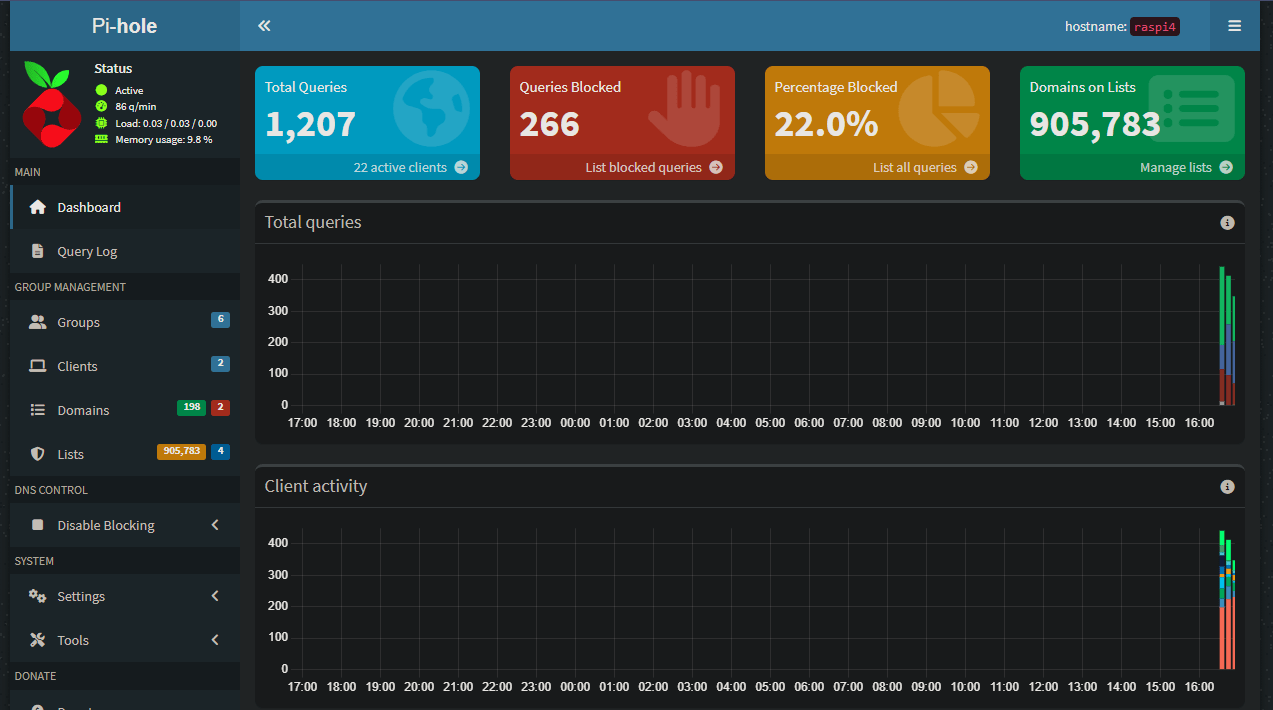
Table of Contents (4 min read)
Pi-hole & AdGuard Home: Network-Wide Ad Blocking & Split-Horizon DNS
In modern home and small-office networks, telemetry tracking, malicious ad networks, and smart device analytics silently consume upstream bandwidth and compromise user privacy. While browser extensions like uBlock Origin work well on desktop PCs, they cannot protect smart TVs, mobile gaming devices, IoT security cameras, or home automation sensors.
The definitive solution is network-level DNS sinkholing. By intercepting DNS queries before packets leave your router, tools like Pi-hole and AdGuard Home inspect every domain resolution request in real time, returning 0.0.0.0 for known advertisers, trackers, and telemetry telemetry nodes.
In our DenverNerd homelab running on a Dell PowerEdge T20 server under Proxmox VE, DNS is engineered as a redundant, enterprise-grade service integrated directly with Windows Server Active Directory and local Caddy edge proxies.
1. Homelab DNS Architecture & Active Directory Integration
Rather than pointing all client devices directly to an external DNS resolver (like 1.1.1.1 or 8.8.8.8), our network implements a hybrid split-horizon DNS topology:
[Clients / Workstations]
           │ (DHCP Option 6: DNS=192.168.70.5, 192.168.70.6)
           ▼
[Primary: Pi-hole LXC (192.168.70.5)] ── Failover ──► [Secondary: AdGuard Home (192.168.70.6)]
           │
           ├─ If query ends in '*.internal.denvernerd.com' ──► [Local Caddy Ingress (192.168.70.2)]
           │
           ├─ If query ends in '*.corp.local' (Active Directory) ──► [Windows Server 2022 DC (192.168.70.10)]
           │
           └─ All other queries (Internet) ──► [Cloudflare / Quad9 DoT (DNS-over-TLS)]
Why Active Directory Conditional Forwarding Matters
If you administer a Windows domain in your homelab with domain-joined workstations, pointing client PCs directly to a vanilla Pi-hole breaks Kerberos authentication, LDAP domain joins, and Group Policy updates because Pi-hole does not know about Active Directory SRV records (_ldap._tcp.dc._msdcs.corp.local).
To fix this, we configure Conditional Forwarding inside /etc/dnsmasq.d/02-active-directory.conf on the Pi-hole host:
# Forward all Active Directory domain queries to the Windows Server Domain Controller
server=/corp.local/192.168.70.10
server=/70.168.192.in-addr.arpa/192.168.70.10
2. Deploying Pi-hole on Proxmox VE (Debian 12 LXC)
Running Pi-hole inside an unprivileged Debian 12 LXC container minimizes overhead (consuming less than 150 MB of RAM) while providing instant snapshot rollbacks:
Docker Compose Stack (docker-compose.yml)
version: "3.8"

services:
  pihole:
    container_name: pihole
    image: pihole/pihole:latest
    ports:
      - "53:53/tcp"
      - "53:53/udp"
      - "8080:80/tcp"
    environment:
      TZ: 'America/Denver'
      WEBPASSWORD: '${PIHOLE_ADMIN_PASSWORD}'
      FTLCONF_LOCAL_IPV4: '192.168.70.5'
      PIHOLE_DNS_: '1.1.1.1;1.0.0.1'
      DNSMASQ_LISTENING: 'local'
    volumes:
      - './etc-pihole:/etc/pihole'
      - './etc-dnsmasq.d:/etc/dnsmasq.d'
    restart: unless-stopped
3. Curating Blocklists: Balancing Security with Zero Breakage
The true effectiveness of a DNS sinkhole depends on blocklist curation. Overly aggressive public lists cause false positives—breaking streaming services, app stores, and family mobile banking. A fragile setup frustrates users and leads to people disabling ad blocking entirely.
Our approach combines two validated lists:
A. The Personal Safe Whitelist (block_custom.txt)
We maintain a custom-curated whitelist file located at pihole_block_custom.txt (mirrored as block_custom.txt). This list documents benign domains that generic blocklists occasionally flag, ensuring essential services (smart home updates, Plex telemetry, streaming CDNs) never fail.
B. The Automated Firebog Community List (parsed_firebog.txt)
For outbound ad networks and malicious tracking nodes, we sync with the Firebog community "tick" lists, mirrored locally at parsed_firebog.txt. The "ticked" lists are strictly vetted to eliminate false positives while blocking over 400,000 ad and tracker domains.
Automated Gravity Sync Cron Script
To keep the blocklist fresh without manual intervention, a cron job executes every Friday at 03:00 AM:
#!/usr/bin/env bash
# /opt/scripts/update-pihole-gravity.sh
set -euo pipefail

echo "[$(date -u)] Syncing Firebog blocklist and refreshing Pi-hole gravity..."
curl -sSL "https://v.firebog.net/hosts/Tick-lists.txt" -o /tmp/firebog_sources.txt

# Run gravity update inside container
docker exec pihole pihole -g

echo "[$(date -u)] Gravity refresh completed successfully."
4. Local DNS Records: Seamless Homelab Navigation
Instead of memorizing IP addresses and ports for every homelab service, Pi-hole provides local DNS mapping:
| Domain FQDN | Target Destination | Service Description |
|---|---|---|
pve.internal.denvernerd.com |
192.168.70.10:8006 |
Proxmox VE Hypervisor Console |
omv.internal.denvernerd.com |
192.168.70.15:80 |
OpenMediaVault Storage Management |
cockpit.internal.denvernerd.com |
192.168.70.15:9090 |
Cockpit Linux Administration |
plex.internal.denvernerd.com |
192.168.70.20:32400 |
Plex Media Streaming Server |
router.internal.denvernerd.com |
192.168.70.1:443 |
OPNsense Edge Gateway |
When paired with a local Caddy reverse proxy providing valid wildcard internal SSL certificates via Let's Encrypt DNS-01 challenges, every service loads over HTTPS without browser security warnings.
5. Summary & Downloads
A properly architected Pi-hole setup is the single most impactful infrastructure upgrade you can make for your home network. By implementing redundant resolvers, conditional Active Directory routing, and automated blocklist maintenance, you achieve total privacy and ad blocking without breaking everyday services.
Download the curated DenverNerd lists directly:
Discussion (0)
Community Guidelines EnforcedNo community comments yet. Be the first to share your thoughts!
Join the Community Discussion
Sign in or create an account to share observations, tuning setups, and connect with other makers.