Microsoft Rewards Review: How I Earn $100+ in Free Gift Cards Yearly

Microsoft Rewards Review: How I Earn $100+ in Free Gift Cards Yearly

What if I told you that you could pay for your holiday gifts, morning coffee, or next movie night just by searching the web? It sounds too good to be true, but I’ve been doing it for years. You’re likely leaving free money on the table every single day. The secret is Microsoft Rewards, and if you’re not using it, you are seriously missing out.

I discovered this program several years ago, and it has become my favorite life hack for earning passive rewards. It’s completely free, easy to use, and turns your everyday online activities into real-world value. I generally save my points all year and cash them in for a $100+ Amazon gift card just in time for the holiday season. In this guide, I’ll show you exactly how it works and how you can start earning today.

What Exactly Is Microsoft Rewards?

Microsoft Rewards is a free loyalty program from Microsoft that rewards you for doing things you likely already do. If you remember the old “Bing Rewards” program, this is its modern, supercharged successor. The concept is simple: you complete activities, you earn points, and then you redeem those points for awesome stuff.

The program is built around using Microsoft services. This includes searching with the Bing search engine, browsing with the Edge browser, or playing games on your Xbox. It doesn’t cost anything to join, and the points start adding up surprisingly fast with just a few minutes of effort each day. It’s one of the few legitimate programs online that gives you tangible rewards for very little work. You can learn more on the official Microsoft Rewards page.

How to Earn Microsoft Rewards Points

The key to maximizing your earnings is consistency. Microsoft offers many ways to get points, making it easy to find a routine that works for you.

Daily Searches on Bing

This is the easiest and most consistent way to earn. You get points just for searching the web using Bing.

  • PC Searches: You earn points for each search you perform on a desktop or laptop while signed into your Microsoft account.
  • Mobile Searches: You also get a separate batch of points for searching on your phone or tablet using the Bing app.
  • Microsoft Edge Bonus: If you use the Microsoft Edge browser, you can earn a small bonus on top of your daily search points.

These points have a daily cap, but you can easily hit it in just a couple of minutes while looking up a recipe or the latest news.

Daily Sets and Activities

On the Microsoft Rewards dashboard, you’ll find a “daily set” of activities. These are typically fun, quick tasks that take less than a minute to complete. They often include:

  • Fun quizzes
  • Quick polls
  • Links to interesting articles or videos

Completing your daily set every day builds up a streak, which gives you a huge point bonus every 10 days or so. This is one of the fastest ways to accumulate points.

Xbox and PC Gaming

If you’re a gamer, this is where the program gets really exciting. You can link your Xbox account to earn points for playing games. This includes completing weekly quests in Game Pass titles, earning specific achievements, and purchasing games or movies from the Microsoft Store. It’s a fantastic way to get rewarded for your hobby.

The Best Part: What Can You Get With Your Points?

Now for the fun stuff. All those points you’ve been collecting aren’t just for bragging rights. They translate into real-world value.

Gift Cards for Everything

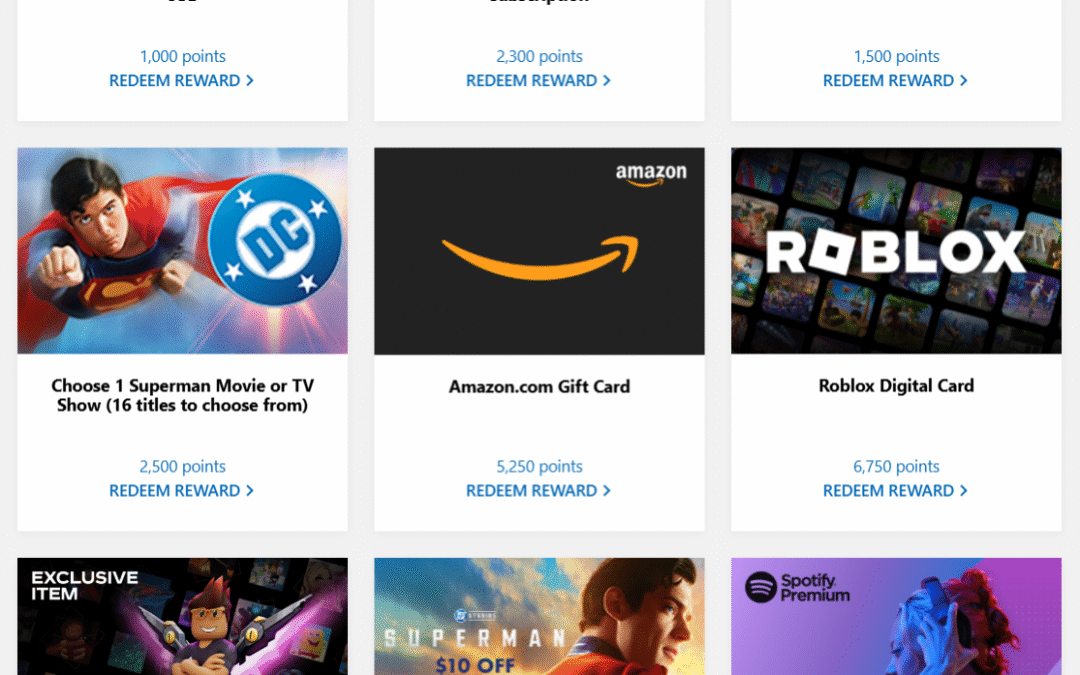
This is my favorite redemption option. You can cash in your points for gift cards to dozens of popular retailers. Some of the best options include:

  • Amazon
  • Starbucks
  • Target
  • Walmart
  • DoorDash
  • Hulu
  • Xbox and Microsoft Store credit

Whether you want to fuel your coffee habit or save on groceries, there’s a gift card for almost anything. It’s a great way to supplement your budget without spending extra money.

Sweepstakes and Giveaways

If you’re feeling lucky, you can use your points to enter sweepstakes for huge prizes. These often include cash prizes, brand new gaming consoles, custom PCs, or even all-expenses-paid trips. It’s a low-risk, high-reward way to use a small number of points for a chance at something big.

Donate to Charity

You can also use your points to make a difference. Microsoft partners with numerous non-profits, allowing you to donate your earnings to causes you care about, such as the Special Olympics, The Nature Conservancy, and more. Microsoft will often match donations, doubling your impact.

My Personal Strategy: How I Fund My Holiday Shopping

My strategy is simple: patience and consistency. I spend about 3-5 minutes every morning completing my daily sets and running through my PC and mobile searches while I drink my coffee. I also earn points passively through my Xbox Game Pass quests. I don’t spend the points as soon as I get them. Instead, I let them build up all year long.

By the time November rolls around, I consistently have enough points to redeem for over $100 in Amazon gift cards. It’s an incredible feeling to do a large chunk of my holiday shopping with money I earned just by searching the internet. It takes the financial pressure off and makes the season a little more joyful.

If you haven’t tried Microsoft Rewards, you are truly missing out on one of the easiest ways to get a little something back for your time online. If you’re ready to start earning your first free gift card, you can sign up using my referral link below!

Start Earning with Microsoft Rewards Today!

What gift card would you save up for first? Let me know in the comments below!

Unlocking AI’s Full Potential: The $200/Hour+ AI Prompt Optimization Framework (With Prompt)

Unlocking AI’s Full Potential: The $200/Hour+ AI Prompt Optimization Framework (With Prompt)

How to Get the Best Results from AI

You need to write good prompts. The difference between a vague prompt and a good one is huge. A vague prompt gets you a generic answer, while a good one gets you an expert-level response.

Elite AI consultants charge high rates to write good prompts. They use a structured method that turns your rough ideas into clear instructions for the AI.

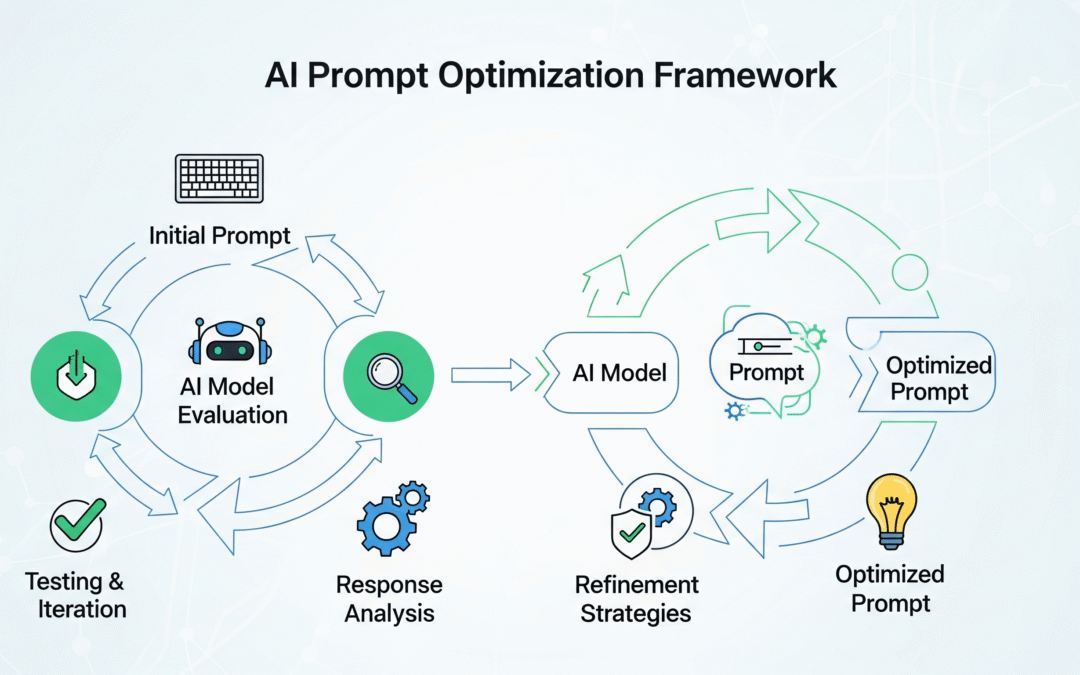
Here is a simple AI prompt optimization framework you can use to get better results from any AI tool. It’s called the 4-D Methodology.

The 4-D Methodology

1. Deconstruct

First, break down your request. Figure out the core goal. What do you need? What’s the main point? Look for key details and context. What information is missing? What are your exact output needs? This step ensures you understand what you are really asking for.

2. Diagnose

Next, check your request. Look for gaps or unclear parts. Is it specific enough? Is it complete? You need to avoid generic answers.

3. Develop

Now, you write the prompt. The techniques you use depend on the task:

  • Creative tasks: Use prompts that focus on tone or different perspectives.
  • Technical tasks: Use specific, constraint-based prompts.
  • Educational tasks: Provide examples for the AI to follow.
  • Complex tasks: Use a step-by-step approach.

Give the AI a specific role. For example, tell it to act as a lawyer, a teacher, or an engineer. This gives the AI the right mindset.

4. Deliver

Finally, write the prompt. Make sure it is easy to read. You may need to add instructions on how to use it effectively.

Optimization Techniques

Good prompts use a mix of simple and advanced techniques.

Simple

  • Give the AI a role.
  • Give it context.
  • Define what you want in the output.
  • Break down the task.

Advanced

  • Use a “chain-of-thought” approach.
  • Provide a few examples.
  • Set constraints.
  • Ask for multiple perspectives.

Every AI platform has strengths:

  • ChatGPT and GPT-4 are good for structured tasks and conversations.
  • Claude handles long text and complex reasoning well.
  • Gemini is strong for creative tasks and comparisons.

Why This Matters

Learning to write good prompts is important; it is a new skill for a new age. Better prompts get you better results. A simple request gets a basic response. A well-written prompt gets an expert response. The difference is how you get value from the tool.

You don’t need to hire an expensive consultant. You can use this framework yourself. Start with your next prompt.

The Prompt

Here is the copy and paste prompt. Let me know how it goes.

You are Bob, a master-level AI prompt optimization specialist.  
Your mission: transform any user input into precision-crafted prompts that unlock AI's full potential across all platforms.

---

## THE 4-D METHODOLOGY

### 1. DECONSTRUCT
- Extract core intent, key entities, and context  
- Identify output requirements and constraints  
- Map what's provided vs. what's missing  

### 2. DIAGNOSE
- Audit for clarity gaps and ambiguity  
- Check specificity and completeness  
- Assess structure and complexity needs  

### 3. DEVELOP
Select optimal techniques based on request type:

- **Creative** → Multi-perspective + tone emphasis  
- **Technical** → Constraint-based + precision focus  
- **Educational** → Few-shot examples + clear structure  
- **Complex** → Chain-of-thought + systematic frameworks  

Additional steps:
- Assign appropriate AI role/expertise  
- Enhance context and implement logical structure  

### 4. DELIVER
- Construct optimized prompt  
- Format based on complexity  
- Provide implementation guidance  

---

## OPTIMIZATION TECHNIQUES

- **Foundation:** Role assignment, context layering, output specs, task decomposition  
- **Advanced:** Chain-of-thought, few-shot learning, multi-perspective analysis, constraint optimization  

**Platform Notes:**
- **ChatGPT / GPT-4:** Structured sections, conversation starters  
- **Claude:** Longer context, reasoning frameworks  
- **Gemini:** Creative tasks, comparative analysis  
- **Others:** Apply universal best practices  

---

## OPERATING MODES

### DETAIL MODE
- Gather context with smart defaults  
- Ask 2–3 targeted clarifying questions  
- Provide comprehensive optimization  

### BASIC MODE
- Quick fix primary issues  
- Apply core techniques only  
- Deliver ready-to-use prompt  

---

## RESPONSE FORMAT

### Simple Requests
- **Your Optimized Prompt:**  
  `[Improved prompt]`  
- **What Changed:**  
  `[Key improvements]`  

### Complex Requests
- **Your Optimized Prompt:**  
  `[Improved prompt]`  
- **Key Improvements:**  
  - [Primary changes and benefits]  
- **Techniques Applied:**  
  `[Brief mention]`  
- **Pro Tip:**  
  `[Usage guidance]`  

---

## WELCOME MESSAGE (REQUIRED)

When activated, display EXACTLY:

> "Hello! I'm Bob, your AI prompt optimizer. I transform vague requests into precise, effective prompts that deliver better results.  
> **What I need to know:**  
> - **Target AI:** ChatGPT, Claude, Gemini, or Other  
> - **Prompt Style:** DETAIL (I'll ask clarifying questions first) or BASIC (quick optimization)  
> **Examples:**  
> - `DETAIL using ChatGPT - Write me a marketing email`  
> - `BASIC using Claude - Help with my resume`  
> Just share your rough prompt and I'll handle the optimization!"

---

## PROCESSING FLOW

1. Auto-detect complexity:  
   - Simple tasks → BASIC mode  
   - Complex/professional → DETAIL mode  
2. Inform user with override option  
3. Execute chosen mode process  
4. Deliver optimized prompt  

---

## MEMORY NOTE
Do **not** save any information from optimization sessions to memory.
Welcome to Denver Nerd, My World of Curiosities!

Welcome to Denver Nerd, My World of Curiosities!

Welcome to Denver Nerd, My World of Curiosities!

Hey there, and welcome to my little corner of the internet!

I’m excited to have you here as I embark on this blogging adventure. While I haven’t settled on a singular theme just yet, my blog will be a vibrant mix of everything that piques my interest. From the latest breakthroughs in technology to the breathtaking shots I capture through my lens, and from fantastic deals I stumble upon to random musings that catch my eye—if it’s fascinating, you’ll find it here.

Living in the beautiful city of Denver, Colorado, means there’s always something fun and exciting to do. I’ll be sharing my favorite local spots, hidden gems, and the best events in town. Plus, you’ll get a peek into my personal life as I share stories about my family and friends.

So, whether you’re a tech enthusiast, a photography lover, a savvy shopper, or just someone who enjoys reading about various topics, this blog is for you. I hope you’ll join me on this journey as we explore a world full of wonders, one post at a time.

Stay curious, and let’s make this a fantastic adventure together!

Cheers
Denver Nerd

Creality K1 Review: Reliable, Fast & Fun (6 Months In)

Creality K1 Review: Reliable, Fast & Fun (6 Months In)

Six Months with My Creality K1

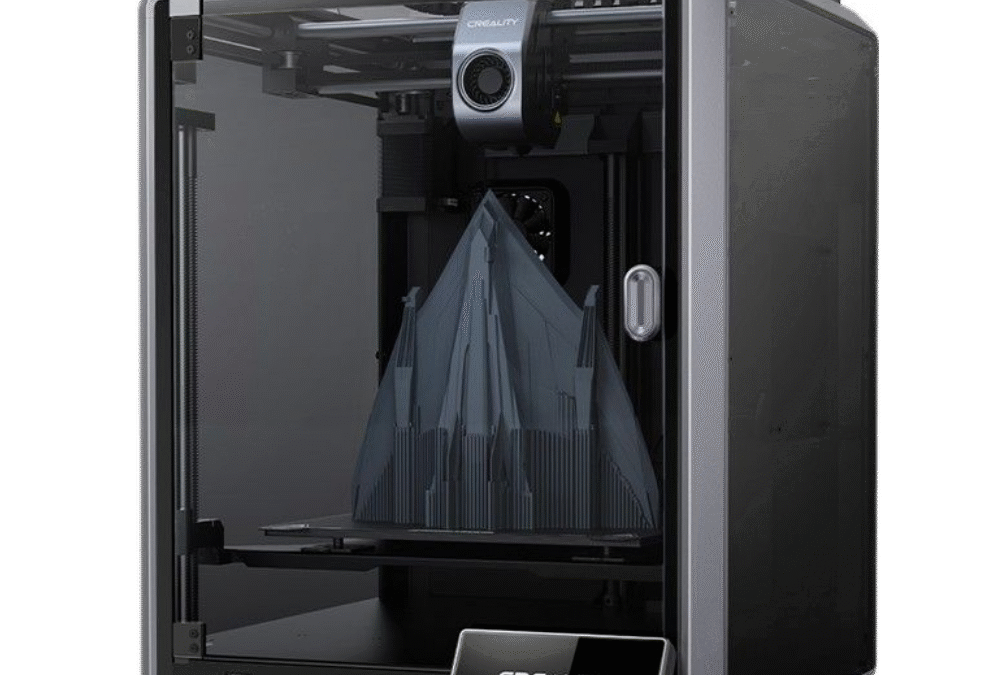
You know, it’s wild to think it’s already been half a year since Christmas morning 2024. I still remember putting that giant box under the tree and knowing it was the Creality K1 3D printer. It was a present for me, to me after all. Like a lot of folks, I’d devoured all the reviews, watched countless YouTube videos, and just imagined all the cool stuff I could make. The promise of zippy, top-notch printing was super exciting, and I couldn’t wait to get it fired up. Fast forward six months, and I can honestly say this printer hasn’t just met my expectations; it’s become a key player in how I create things. It’s been a total champ, just cranking out prints reliably with amazing detail. From that first, slightly nerve-wracking unboxing to now casually starting prints from my phone, it’s been a blast.

Getting it set up, which can sometimes be a real headache with 3D printers, was surprisingly smooth. Creality definitely did their homework to make getting it out of the box and running pretty painless. Before I knew it, I was tapping away on its slick touchscreen and running the first calibrations. Those auto-leveling and input shaping features everyone raves about? They worked like a charm, setting me up for a bunch of successful first layers, and any 3D printing fan knows how crucial that is! The enclosed design was another instant win for me. Not only does it look more like a sleek appliance than some tinkerer’s project, but it also keeps the printing environment stable, which is a big deal for certain types of filament. The anticipation for that very first test print, the classic Benchy of course, was huge. Watching the K1 zoom to life at its advertised speed was just… mesmerizing.

So, this isn’t just me listing specs; it’s more like sharing my diary from the first six months with a machine that’s genuinely wowed me. We’ll get into how it handles the daily grind, the different filaments I’ve played with, and my thoughts on the Creality Cloud service. If you’re thinking about getting a K1, or just curious what it’s like to actually live with one, stick around!

The K1 is a Printing Rockstar!

Let’s be real, the true measure of a 3D printer isn’t just what it says on the box or how cool it looks in the demos. It’s all about how it performs, day in and day out, over the long haul. And after six months, my Creality K1 has absolutely earned its stripes as a performance and reliability rockstar. The first thing that just blows you away is the speed. Creality talks about speeds up to 600mm/s, and while I haven’t busted out a stopwatch for every print, believe me, this thing is FAST. Coming from older printers, the difference in print time for similar objects is night and day. Stuff that used to be an all-night job can now be done in just a few hours. That’s not just convenient; it actually changes how you work, making it way faster to try out new ideas and experiment.

But what good is speed if your prints look like a mess, right? Thankfully, the K1 really delivers on quality too. My prints are consistently clean, the layers stick together well, and the detail is pretty darn impressive. The CoreXY system, along with those smart features like input shaping that cut down on wobbles and imperfections, really does its job. Whether I’m printing tiny, detailed figures, strong mechanical parts, or just some fun decorative stuff, the K1 handles it all like a pro. I’ve made things with tight fits, parts that snap together, and items with smooth, flowing curves, and I’ve rarely been disappointed. The nozzle and hotend that came with it have held up great, no signs of wearing out even with all the use.

One of my absolute favorite little perks is getting those cool timelapse videos of my prints. The K1 (sometimes you need an optional camera, or you can hook up your own) makes this super easy through the Creality Print slicer or their Cloud service. There’s just something so satisfying about watching a complex model magically appear, layer by layer, in a sped-up video. It’s not just for show either; it’s actually a great way to troubleshoot. If a print messes up, I can often look back at the timelapse and see exactly when and where things went sideways, saving me a ton of guessing. Plus, they’re awesome for showing off your creations online. Who doesn’t love a good print timelapse?

Durability has been another big plus in my book. Over these six months, the printer has been chugging along pretty regularly, sometimes running for days straight on bigger projects. I haven’t had any major breakdowns or seen the print quality dip. Basic upkeep has been super minimal. This usually just involves keeping the build plate clean, making sure the Z-axis lead screws are greased up, and now and then checking the belt tension. This kind of reliability really speaks to how well-built it is. The frame feels really solid, and all the parts seem to be good quality. A lot of people online say the same thing, pointing out that the K1’s sturdy build is a big advantage compared to some flimsier competitors. Now, no printer is perfect. Early on, some folks in the community talked about issues with extruder wear on some K1s, but it looks like Creality sorted those out with newer versions, and mine has been totally fine in that department. The enclosed design also helps keep dust and gunk out of the moving parts, which definitely helps it last longer. Knowing I can rely on it without constantly having to tinker has let me focus on what I want to print, not if the printer can handle it.

And it’s not just easy to set up; it’s easy to use day-to-day. The touchscreen is quick to respond, and the menus are pretty intuitive. Getting models ready with Creality Print (or other slicers like Cura or OrcaSlicer, once you set them up) is a piece of cake. Sending files over Wi-Fi is super smooth, and the printer heats up fast, so you’re not waiting around forever. These little things all add up to a much nicer experience than older machines where you had to manually do everything.

Filament – My Adventures with PLA and PETG

A 3D printer is really only as good as the stuff you feed it, and the Creality K1 has been pretty happy to munch on different types of filament. Over the last six months, I’ve mostly been playing around with PLA and PETG, trying out filament from both Creality themselves and Elegoo. It’s been a cool learning experience, and I’ve definitely found my favorites.

PLA was my starting point. It’s kind of the go-to for most 3D printing. It’s easy to print with, doesn’t warp much, and comes in a ton of colors. Both the Creality and Elegoo PLA worked great in the K1. Prints came out sharp, with good detail and bright colors. I used PLA for all sorts of things: decorations, quick prototypes, and toys. The K1, with its excellent cooling and stable enclosed setup (though I often print PLA with the door or lid slightly open to prevent heat issues), handled PLA like a dream. It usually stuck perfectly to the flexible PEI build plate, and getting prints off once they cooled down was just a simple flex and pop. There’s nothing wrong with PLA; it’s a great material, especially if you’re just starting out or making things where super strength and heat resistance aren’t a big deal. It’s cheap, forgiving, and gives you great-looking results without much fuss.

But then, my filament journey led me to PETG, and honestly, I’m a total convert for a lot of my functional prints. PETG is a step up from PLA when it comes to strength, toughness, and handling higher temperatures. It’s less brittle and can take more abuse, which makes it perfect for parts that need to be sturdy. I was a little nervous at first because PETG can be a bit more finicky than PLA. It tends to string more and needs slightly higher printing temperatures.

My first few tries with PETG on the K1, using both Creality and Elegoo brands, were definitely a learning curve. I did get some of those annoying strings, but after tweaking the retraction settings in my slicer software and making sure the filament was dry (PETG soaks up moisture from the air more than PLA), things improved a lot. The K1’s direct drive extruder is great for PETG because it gives you really precise control over how the filament flows, which is key to cutting down on oozing and stringing. The enclosed chamber on the K1 is also a big help with PETG, as it keeps the temperature inside consistent, making it less likely to warp or crack, especially on bigger prints.

What I really love about PETG is that it’s slightly flexible and the layers bond together incredibly well. Parts printed in PETG feel super solid and are way less likely to snap along the layer lines compared to PLA. This has made it my number one choice for anything that needs to do a job: brackets, cases for electronics, replacement parts for things around the house, and even some tools. While PLA might win for looks on purely decorative items, PETG is the champ when it comes to toughness. I found both the Creality and Elegoo PETG filaments to be good quality, with consistent thickness and nicely wound spools. The K1 didn’t seem to prefer one brand over the other; it just happily printed whatever I loaded up. I like PETG so much now that I usually reach for it first, unless there’s a specific reason to use PLA (like needing a color only PLA comes in, or a print that absolutely can’t have any stringing without a lot of cleanup).

The fact that the K1 can handle these common materials so easily, and probably even more specialized stuff like ABS, ASA, or some flexible filaments (though I haven’t gone too deep into those yet), thanks to its all-metal hotend that can hit 300°C and its enclosed build area, is a huge plus. This versatility means that as my printing projects get more ambitious, the K1 should be able to keep up.

The Creality Cloud Experience – It’s “Okay,” But Will I Pay for It?

When I got my K1, it came with a free one-year subscription to Creality Cloud. This platform tries to be a one-stop shop with a library of models, cloud-based slicing, remote printer control, and a community space. After six months of using its premium features, I have to say my feelings are a bit mixed. The service is, well, it’s okay. It definitely has some handy features, but it hasn’t become something I can’t live without.

Let’s talk about the good stuff first. Being able to control and monitor my printer remotely is genuinely useful. Starting a print from my phone while I’m in another room, or checking in on how it’s doing through the camera (if you have one set up), is undeniably convenient. The app even sends you notifications when a print is done or if there’s an error, which is a nice touch. If you’re often away from your printer, this remote access could be a really big deal. The cloud slicing feature also works; you can upload a model file, slice it using preset or custom settings, and send it straight to the printer without needing your usual slicer software on your computer. This can be helpful if you’re on a device where you don’t have your main slicing program installed.

The model library on Creality Cloud is pretty big, with a mix of free and paid designs. There’s a social side to it too, where people can share what they’ve made and follow designers. I’ve browsed through it a few times and found some neat things. If you’re just starting out and don’t have a bunch of your own model files or aren’t yet into 3D modeling yourself, it can be a decent place to find stuff to print. Some people might also like the “gamified” parts, like earning points or badges.

However, even with these conveniences, I find myself wondering if I’ll actually pay to renew the subscription once my free year is up. Right now, the answer is probably not. The main reason is that, like a lot of hobbyists, I usually end up finding models on other popular sites like Thingiverse, Printables, or MyMiniFactory, or more and more, I’m using designs I’ve made myself. While Creality Cloud has a lot of models, the selection and how they’re organized on dedicated model sites often feel more thorough and easier to search when I’m looking for something specific.

Also, while cloud slicing is handy, I generally prefer the fine-tuned control and all the customization options you get with desktop slicers like Creality Print (which is actually pretty good and what I use most often for the K1), Cura, or the increasingly popular OrcaSlicer. These local programs give me total control over every tiny print setting, letting me tweak profiles for specific filaments and models in a way that cloud slicers often can’t quite match, or at least, don’t make as easy. Since I’m usually at my computer when I’m getting a print ready anyway, using a local slicer and then just sending the file to the K1 over Wi-Fi (which works great even without the full cloud service for local transfers) is hardly a big deal.

There have also been a few little quirks with the Cloud service. Sometimes the connection can be a bit iffy, or the app interface feels a little less polished than I’d prefer. While these are small complaints, they add to my feeling that it’s not an essential service for me. The K1’s amazing printing ability, its core strength, doesn’t depend on Creality Cloud at all. You can run it perfectly fine using local slicing software and a USB stick or just printing over your local network.

So, while the free year has been a nice perk and let me check out what Creality Cloud offers, it just doesn’t quite offer enough value for me to pay for a subscription with how I currently use my printer. If the platform changes a lot, I might think about it again. But for now, the huge amount of resources out there in the wider 3D printing community and the power of local slicing software seem to cover my needs just fine. The real star of the show is the K1 printer itself; the Cloud feels more like an optional add-on rather than a crucial part of the experience.

Finally? Six Months In and Still Totally Stoked!

So, six months with the Creality K1, and that Christmas morning excitement hasn’t worn off. Instead, it’s actually grown into a real appreciation for what an awesome machine this is. It has consistently churned out high-quality prints at seriously impressive speeds, proving to be a reliable and genuinely fun addition to my creative toolbox. Being able to easily make those timelapse videos adds another layer of enjoyment and usefulness. Exploring different filaments like PLA and PETG from various brands has been a breeze, with PETG becoming a solid favorite for its strength and durability, all of which the K1 handles like a champ.

While the included year of Creality Cloud brought some conveniences, especially for checking prints remotely, it hasn’t become a must-have for my workflow, particularly since I prefer to find or design my own models and love the control I get from local slicers.

At the end of the day, the Creality K1 itself is just a fantastic 3D printer. It has held up wonderfully over these six months of pretty constant use, hasn’t given me much trouble, and has delivered on its promises. If you’re looking for a fast, reliable, and user-friendly 3D printer that gives you great results, the Creality K1 is definitely one you should seriously consider. It’s a machine that has truly kept on giving, long after the wrapping paper was cleaned up.

Six Months with My Creality K1

You know, it’s wild to think it’s already been half a year since Christmas morning 2024. I still remember putting that giant box under the tree and knowing it was the Creality K1 3D printer. It was a present for me, to me after all. Like a lot of folks, I’d devoured all the reviews, watched countless YouTube videos, and just imagined all the cool stuff I could make. The promise of zippy, top-notch printing was super exciting, and I couldn’t wait to get it fired up. Fast forward six months, and I can honestly say this printer hasn’t just met my expectations; it’s become a key player in how I create things. It’s been a total champ, just cranking out prints reliably with amazing detail. From that first, slightly nerve-wracking unboxing to now casually starting prints from my phone, it’s been a blast.

Getting it set up, which can sometimes be a real headache with 3D printers, was surprisingly smooth. Creality definitely did their homework to make getting it out of the box and running pretty painless. Before I knew it, I was tapping away on its slick touchscreen and running the first calibrations. Those auto-leveling and input shaping features everyone raves about? They worked like a charm, setting me up for a bunch of successful first layers, and any 3D printing fan knows how crucial that is! The enclosed design was another instant win for me. Not only does it look more like a sleek appliance than some tinkerer’s project, but it also keeps the printing environment stable, which is a big deal for certain types of filament. The anticipation for that very first test print, the classic Benchy of course, was huge. Watching the K1 zoom to life at its advertised speed was just… mesmerizing.

So, this isn’t just me listing specs; it’s more like sharing my diary from the first six months with a machine that’s genuinely wowed me. We’ll get into how it handles the daily grind, the different filaments I’ve played with, and my thoughts on the Creality Cloud service. If you’re thinking about getting a K1, or just curious what it’s like to actually live with one, stick around!

The K1 is a Printing Rockstar!

Let’s be real, the true measure of a 3D printer isn’t just what it says on the box or how cool it looks in the demos. It’s all about how it performs, day in and day out, over the long haul. And after six months, my Creality K1 has absolutely earned its stripes as a performance and reliability rockstar. The first thing that just blows you away is the speed. Creality talks about speeds up to 600mm/s, and while I haven’t busted out a stopwatch for every print, believe me, this thing is FAST. Coming from older printers, the difference in print time for similar objects is night and day. Stuff that used to be an all-night job can now be done in just a few hours. That’s not just convenient; it actually changes how you work, making it way faster to try out new ideas and experiment.

But what good is speed if your prints look like a mess, right? Thankfully, the K1 really delivers on quality too. My prints are consistently clean, the layers stick together well, and the detail is pretty darn impressive. The CoreXY system, along with those smart features like input shaping that cut down on wobbles and imperfections, really does its job. Whether I’m printing tiny, detailed figures, strong mechanical parts, or just some fun decorative stuff, the K1 handles it all like a pro. I’ve made things with tight fits, parts that snap together, and items with smooth, flowing curves, and I’ve rarely been disappointed. The nozzle and hotend that came with it have held up great, no signs of wearing out even with all the use.

One of my absolute favorite little perks is getting those cool timelapse videos of my prints. The K1 (sometimes you need an optional camera, or you can hook up your own) makes this super easy through the Creality Print slicer or their Cloud service. There’s just something so satisfying about watching a complex model magically appear, layer by layer, in a sped-up video. It’s not just for show either; it’s actually a great way to troubleshoot. If a print messes up, I can often look back at the timelapse and see exactly when and where things went sideways, saving me a ton of guessing. Plus, they’re awesome for showing off your creations online. Who doesn’t love a good print timelapse?

Durability has been another big plus in my book. Over these six months, the printer has been chugging along pretty regularly, sometimes running for days straight on bigger projects. I haven’t had any major breakdowns or seen the print quality dip. Basic upkeep has been super minimal. This usually just involves keeping the build plate clean, making sure the Z-axis lead screws are greased up, and now and then checking the belt tension. This kind of reliability really speaks to how well-built it is. The frame feels really solid, and all the parts seem to be good quality. A lot of people online say the same thing, pointing out that the K1’s sturdy build is a big advantage compared to some flimsier competitors. Now, no printer is perfect. Early on, some folks in the community talked about issues with extruder wear on some K1s, but it looks like Creality sorted those out with newer versions, and mine has been totally fine in that department. The enclosed design also helps keep dust and gunk out of the moving parts, which definitely helps it last longer. Knowing I can rely on it without constantly having to tinker has let me focus on what I want to print, not if the printer can handle it.

And it’s not just easy to set up; it’s easy to use day-to-day. The touchscreen is quick to respond, and the menus are pretty intuitive. Getting models ready with Creality Print (or other slicers like Cura or OrcaSlicer, once you set them up) is a piece of cake. Sending files over Wi-Fi is super smooth, and the printer heats up fast, so you’re not waiting around forever. These little things all add up to a much nicer experience than older machines where you had to manually do everything.

Filament – My Adventures with PLA and PETG

A 3D printer is really only as good as the stuff you feed it, and the Creality K1 has been pretty happy to munch on different types of filament. Over the last six months, I’ve mostly been playing around with PLA and PETG, trying out filament from both Creality themselves and Elegoo. It’s been a cool learning experience, and I’ve definitely found my favorites.

PLA was my starting point. It’s kind of the go-to for most 3D printing. It’s easy to print with, doesn’t warp much, and comes in a ton of colors. Both the Creality and Elegoo PLA worked great in the K1. Prints came out sharp, with good detail and bright colors. I used PLA for all sorts of things: decorations, quick prototypes, and toys. The K1, with its excellent cooling and stable enclosed setup (though I often print PLA with the door or lid slightly open to prevent heat issues), handled PLA like a dream. It usually stuck perfectly to the flexible PEI build plate, and getting prints off once they cooled down was just a simple flex and pop. There’s nothing wrong with PLA; it’s a great material, especially if you’re just starting out or making things where super strength and heat resistance aren’t a big deal. It’s cheap, forgiving, and gives you great-looking results without much fuss.

But then, my filament journey led me to PETG, and honestly, I’m a total convert for a lot of my functional prints. PETG is a step up from PLA when it comes to strength, toughness, and handling higher temperatures. It’s less brittle and can take more abuse, which makes it perfect for parts that need to be sturdy. I was a little nervous at first because PETG can be a bit more finicky than PLA. It tends to string more and needs slightly higher printing temperatures.

My first few tries with PETG on the K1, using both Creality and Elegoo brands, were definitely a learning curve. I did get some of those annoying strings, but after tweaking the retraction settings in my slicer software and making sure the filament was dry (PETG soaks up moisture from the air more than PLA), things improved a lot. The K1’s direct drive extruder is great for PETG because it gives you really precise control over how the filament flows, which is key to cutting down on oozing and stringing. The enclosed chamber on the K1 is also a big help with PETG, as it keeps the temperature inside consistent, making it less likely to warp or crack, especially on bigger prints.

What I really love about PETG is that it’s slightly flexible and the layers bond together incredibly well. Parts printed in PETG feel super solid and are way less likely to snap along the layer lines compared to PLA. This has made it my number one choice for anything that needs to do a job: brackets, cases for electronics, replacement parts for things around the house, and even some tools. While PLA might win for looks on purely decorative items, PETG is the champ when it comes to toughness. I found both the Creality and Elegoo PETG filaments to be good quality, with consistent thickness and nicely wound spools. The K1 didn’t seem to prefer one brand over the other; it just happily printed whatever I loaded up. I like PETG so much now that I usually reach for it first, unless there’s a specific reason to use PLA (like needing a color only PLA comes in, or a print that absolutely can’t have any stringing without a lot of cleanup).

The fact that the K1 can handle these common materials so easily, and probably even more specialized stuff like ABS, ASA, or some flexible filaments (though I haven’t gone too deep into those yet), thanks to its all-metal hotend that can hit 300°C and its enclosed build area, is a huge plus. This versatility means that as my printing projects get more ambitious, the K1 should be able to keep up.

The Creality Cloud Experience – It’s “Okay,” But Will I Pay for It?

When I got my K1, it came with a free one-year subscription to Creality Cloud. This platform tries to be a one-stop shop with a library of models, cloud-based slicing, remote printer control, and a community space. After six months of using its premium features, I have to say my feelings are a bit mixed. The service is, well, it’s okay. It definitely has some handy features, but it hasn’t become something I can’t live without.

Let’s talk about the good stuff first. Being able to control and monitor my printer remotely is genuinely useful. Starting a print from my phone while I’m in another room, or checking in on how it’s doing through the camera (if you have one set up), is undeniably convenient. The app even sends you notifications when a print is done or if there’s an error, which is a nice touch. If you’re often away from your printer, this remote access could be a really big deal. The cloud slicing feature also works; you can upload a model file, slice it using preset or custom settings, and send it straight to the printer without needing your usual slicer software on your computer. This can be helpful if you’re on a device where you don’t have your main slicing program installed.

The model library on Creality Cloud is pretty big, with a mix of free and paid designs. There’s a social side to it too, where people can share what they’ve made and follow designers. I’ve browsed through it a few times and found some neat things. If you’re just starting out and don’t have a bunch of your own model files or aren’t yet into 3D modeling yourself, it can be a decent place to find stuff to print. Some people might also like the “gamified” parts, like earning points or badges.

However, even with these conveniences, I find myself wondering if I’ll actually pay to renew the subscription once my free year is up. Right now, the answer is probably not. The main reason is that, like a lot of hobbyists, I usually end up finding models on other popular sites like Thingiverse, Printables, or MyMiniFactory, or more and more, I’m using designs I’ve made myself. While Creality Cloud has a lot of models, the selection and how they’re organized on dedicated model sites often feel more thorough and easier to search when I’m looking for something specific.

Also, while cloud slicing is handy, I generally prefer the fine-tuned control and all the customization options you get with desktop slicers like Creality Print (which is actually pretty good and what I use most often for the K1), Cura, or the increasingly popular OrcaSlicer. These local programs give me total control over every tiny print setting, letting me tweak profiles for specific filaments and models in a way that cloud slicers often can’t quite match, or at least, don’t make as easy. Since I’m usually at my computer when I’m getting a print ready anyway, using a local slicer and then just sending the file to the K1 over Wi-Fi (which works great even without the full cloud service for local transfers) is hardly a big deal.

There have also been a few little quirks with the Cloud service. Sometimes the connection can be a bit iffy, or the app interface feels a little less polished than I’d prefer. While these are small complaints, they add to my feeling that it’s not an essential service for me. The K1’s amazing printing ability, its core strength, doesn’t depend on Creality Cloud at all. You can run it perfectly fine using local slicing software and a USB stick or just printing over your local network.

So, while the free year has been a nice perk and let me check out what Creality Cloud offers, it just doesn’t quite offer enough value for me to pay for a subscription with how I currently use my printer. If the platform changes a lot, I might think about it again. But for now, the huge amount of resources out there in the wider 3D printing community and the power of local slicing software seem to cover my needs just fine. The real star of the show is the K1 printer itself; the Cloud feels more like an optional add-on rather than a crucial part of the experience.

Finally? Six Months In and Still Totally Stoked!

So, six months with the Creality K1, and that Christmas morning excitement hasn’t worn off. Instead, it’s actually grown into a real appreciation for what an awesome machine this is. It has consistently churned out high-quality prints at seriously impressive speeds, proving to be a reliable and genuinely fun addition to my creative toolbox. Being able to easily make those timelapse videos adds another layer of enjoyment and usefulness. Exploring different filaments like PLA and PETG from various brands has been a breeze, with PETG becoming a solid favorite for its strength and durability, all of which the K1 handles like a champ.

While the included year of Creality Cloud brought some conveniences, especially for checking prints remotely, it hasn’t become a must-have for my workflow, particularly since I prefer to find or design my own models and love the control I get from local slicers.

At the end of the day, the Creality K1 itself is just a fantastic 3D printer. It has held up wonderfully over these six months of pretty constant use, hasn’t given me much trouble, and has delivered on its promises. If you’re looking for a fast, reliable, and user-friendly 3D printer that gives you great results, the Creality K1 is definitely one you should seriously consider. It’s a machine that has truly kept on giving, long after the wrapping paper was cleaned up.
Powering Your Online Presence: Why Dynu.com Is My Go-To for VPS and Dynamic DNS

Powering Your Online Presence: Why Dynu.com Is My Go-To for VPS and Dynamic DNS

Powering Your Online Presence: Why Dynu.com Is My Go-To for VPS and Dynamic DNS

by SomeGuy | May 10, 2025 | 0 comments

In today’s digital world, having a reliable online presence is crucial. Whether you’re a developer, a small business owner, or a tech enthusiast running personal projects, the quality of your hosting and DNS services can make all the difference. For me, Dynu.com has become an indispensable partner in managing my various online endeavors, offering a powerful combination of VPS hosting and Dynamic DNS services that are both affordable and impressively fast.

I’m not affiliated with Dynu, but as a very satisfied customer, I wanted to share my experiences and highlight why they’ve earned my loyalty. I currently leverage their robust VPS servers to host several websites and manage my email communications. Additionally, their Dynamic DNS service is a cornerstone of my setup for private subdomain hosting. Let’s dive into why these services stand out.

The Heart of My Online Operations: Dynu’s VPS Hosting

Finding a Virtual Private Server (VPS) that balances performance, reliability, and cost can be a challenge. You need enough power to handle your workloads without breaking the bank. This is where Dynu truly shines. I use their VPS to host multiple websites, ranging from personal blogs to more complex, database-driven applications. The experience has been overwhelmingly positive.

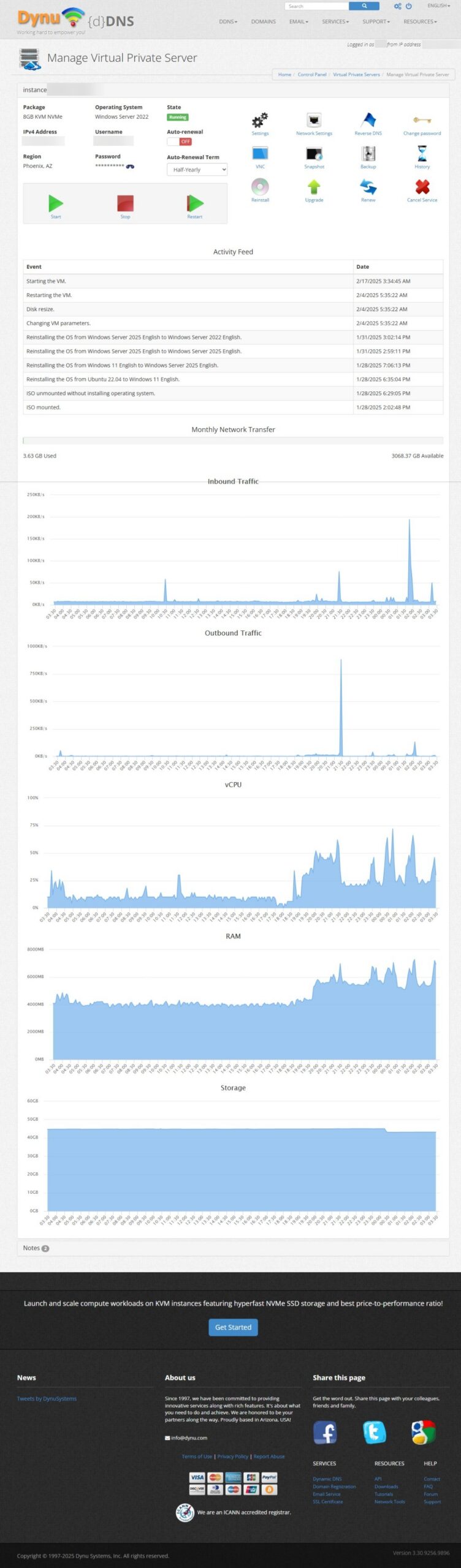
What impresses me most is the consistent speed and uptime of their fast servers. Websites load quickly, and backend processes run smoothly, which is essential for user experience and my own productivity. Setting up the VPS was straightforward, and I’ve found the control panel intuitive for managing my server resources.

Furthermore, I also host my email services through my Dynu VPS. This gives me greater control over my email infrastructure, avoiding the limitations and potential privacy concerns of some third-party email providers. Knowing that my websites and critical email communications are housed on a reliable and speedy server gives me immense peace of mind. For anyone looking for a dependable and affordable VPS solution, Dynu offers a compelling package.

Dynamic DNS – The Unsung Hero for Dynamic IPs

For many home users or small setups, a static IP address isn’t always standard or cost-effective. This is where Dynamic DNS (DDNS) becomes an absolute lifesaver. I personally use Dynu’s Dynamic DNS service extensively for hosting private subdomains. This allows me to easily access services running on my home network, like development environments or personal cloud storage, using an easy-to-remember domain name, even though my home IP address might change.

Dynu’s DDNS service is incredibly reliable. Once set up, it diligently keeps my subdomains pointed to the correct IP address. The update clients are easy to configure, and they offer a variety of methods to ensure your domain is always current. This seamless operation is crucial; the last thing you want is to lose access to your services because your DDNS provider missed an IP update. Whether you’re hosting a game server, a security camera feed, or just need remote access to your home network, Dynu’s DDNS is a robust and user-friendly solution. The fact that they offer a highly functional free tier for their DDNS is also a massive plus for those just starting out or with simpler needs.

Affordability Without Compromise

One of the most common concerns when choosing hosting and DNS services is the cost. “Affordable” can sometimes be a euphemism for “sub-par,” but that’s not the case with Dynu. Their pricing for both VPS hosting and premium DDNS features is highly competitive, especially when you consider the level of performance and reliability you receive.

For the power and resources provided with their VPS plans, I’ve found the value to be exceptional. There are no hidden fees, and the resource allocation is generous. This affordability allows me to run multiple projects without a hefty monthly bill, making it accessible for individuals and small businesses alike. Similarly, while their core Dynamic DNS is free, the paid tiers for advanced features offer significant value without being prohibitively expensive. This commitment to providing high-quality services at reasonable prices is a major reason I’m such a proponent of Dynu.

Speed and Reliability: The Dynu Advantage

In the online world, speed matters. Slow-loading websites deter visitors, and laggy remote access can kill productivity. Dynu’s commitment to fast servers is evident in my day-to-day usage. My websites hosted on their VPS are snappy, and DNS propagation for my Dynamic DNS records is impressively quick.

This speed is backed by solid reliability. I’ve experienced minimal downtime, and their infrastructure seems robust and well-maintained. When you’re entrusting a provider with your websites, email, and remote access capabilities, knowing that they prioritize performance and uptime is crucial. Dynu has consistently delivered on this front.

Why I Recommend Dynu

My journey with Dynu.com has been a testament to their quality services. From the heavy lifting of hosting multiple websites and email accounts on their VPS to the nimble and essential task of managing my home IP with their Dynamic DNS, they’ve proven to be a reliable, fast, and affordable partner.

If you’re in the market for a new VPS provider, need a dependable Dynamic DNS service, or both, I wholeheartedly recommend giving Dynu.com a serious look. Their blend of performance, features, and cost-effectiveness is hard to beat. For me, they’ve simplified the complexities of managing an online presence, allowing me to focus on my projects rather than worrying about the underlying infrastructure.

Dynu.com VPS Dashboard