Managing ASP.NET Core Client-Side Libraries with libman.json
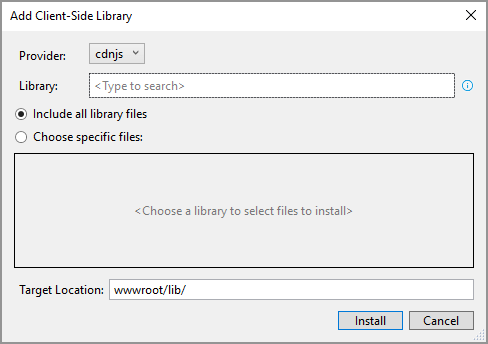
Table of Contents (4 min read)
When building web applications in ASP.NET Core, managing client-side CSS and JavaScript libraries can quickly spiral out of control. Many modern web frameworks push developers toward full Node.js toolchains (Webpack, Vite, npm, yarn) even when the project only needs standard libraries like Bootstrap, jQuery, DataTables, or SignalR client scripts.
For server-rendered web applications, Razor Pages, or .NET 9 Minimal API architectures with server-side views, dragging in thousands of node_modules dependencies into your repository and CI/CD pipelines adds unnecessary overhead.
Microsoft Library Manager (LibMan) is Microsoft's purpose-built, lightweight client-side file acquisition tool designed specifically for ASP.NET Core. It downloads exactly the files you specify directly into wwwroot/lib/ using CDNs like cdnjs, unpkg, or filesystem providers—with zero Node.js footprint.
Why Use LibMan in ASP.NET Core & .NET 9?
- Zero Node.js Runtime Requirement: LibMan runs natively inside Visual Studio or via the .NET Core CLI global tool (
Microsoft.Web.LibraryManager.Cli). You do not need Node.js or npm installed on your development workstation or build server. - Deterministic File-Level Selection: Rather than pulling down complete npm packages containing source code, test suites, and documentation, LibMan allows you to pluck only the specific minified
.min.jsand.min.cssfiles needed for production. - Automated MSBuild Pipeline Integration: With the
Microsoft.Web.LibraryManager.BuildNuGet package, LibMan restore runs automatically ondotnet build, ensuring fresh assets during Docker container builds without bloat. - CDN Multi-Provider Support: Easily switch between
cdnjs,unpkg,filesystem, or custom CDN endpoints.
Production-Ready libman.json Configuration
Here is the standardized, production-tested libman.json configuration I deploy across ASP.NET Core web solutions. It bundles Bootstrap 5, jQuery unobtrusive AJAX, Bootstrap Icons, DataTables, SignalR, and JSONEditor into organized destinations inside wwwroot/:
{
  "version": "1.0",
  "defaultProvider": "cdnjs",
  "libraries": [
    {
      "library": "jquery@3.5.1",
      "files": [
        "jquery.js",
        "jquery.min.js",
        "jquery.min.map"
      ],
      "destination": "wwwroot/lib/jquery/dist/"
    },
    {
      "library": "jquery-ajax-unobtrusive@3.2.6",
      "files": [
        "jquery.unobtrusive-ajax.js",
        "jquery.unobtrusive-ajax.min.js"
      ],
      "destination": "wwwroot/lib/jquery-unobtrusive/"
    },
    {
      "library": "bootstrap@5.2.3",
      "files": [
        "js/bootstrap.js",
        "js/bootstrap.js.map",
        "js/bootstrap.min.js",
        "js/bootstrap.min.js.map",
        "js/bootstrap.bundle.js",
        "js/bootstrap.bundle.js.map",
        "js/bootstrap.bundle.min.js",
        "js/bootstrap.bundle.min.js.map",
        "js/bootstrap.esm.js",
        "js/bootstrap.esm.js.map",
        "js/bootstrap.esm.min.js",
        "js/bootstrap.esm.min.js.map",
        "css/bootstrap.css",
        "css/bootstrap.css.map",
        "css/bootstrap.min.css",
        "css/bootstrap.min.css.map",
        "css/bootstrap.rtl.css",
        "css/bootstrap.rtl.css.map",
        "css/bootstrap.rtl.min.css",
        "css/bootstrap.rtl.min.css.map",
        "css/bootstrap-grid.css",
        "css/bootstrap-grid.css.map",
        "css/bootstrap-grid.min.css",
        "css/bootstrap-grid.min.css.map",
        "css/bootstrap-grid.rtl.css",
        "css/bootstrap-grid.rtl.css.map",
        "css/bootstrap-grid.rtl.min.css",
        "css/bootstrap-grid.rtl.min.css.map",
        "css/bootstrap-reboot.css",
        "css/bootstrap-reboot.css.map",
        "css/bootstrap-reboot.min.css",
        "css/bootstrap-reboot.min.css.map",
        "css/bootstrap-reboot.rtl.css",
        "css/bootstrap-reboot.rtl.css.map",
        "css/bootstrap-reboot.rtl.min.css",
        "css/bootstrap-reboot.rtl.min.css.map",
        "css/bootstrap-utilities.css",
        "css/bootstrap-utilities.css.map",
        "css/bootstrap-utilities.min.css",
        "css/bootstrap-utilities.min.css.map",
        "css/bootstrap-utilities.rtl.css",
        "css/bootstrap-utilities.rtl.css.map",
        "css/bootstrap-utilities.rtl.min.css",
        "css/bootstrap-utilities.rtl.min.css.map"
      ],
      "destination": "wwwroot/lib/bootstrap/dist/"
    },
    {
      "library": "bootstrap-icons@1.10.3",
      "destination": "wwwroot/lib/bootstrap-icons"
    },
    {
      "library": "amcharts4@4.10.32",
      "files": [
        "themes/amcharts.js",
        "themes/amcharts.min.js",
        "themes/amcharts.js.map"
      ],
      "destination": "wwwroot/lib/amcharts/"
    },
    {
      "library": "datatables.net-bs5@1.13.1",
      "files": [
        "dataTables.bootstrap5.css",
        "dataTables.bootstrap5.min.css",
        "dataTables.bootstrap5.js",
        "dataTables.bootstrap5.min.js"
      ],
      "destination": "wwwroot/lib/datatables"
    },
    {
      "library": "jsoneditor@9.10.0",
      "files": [
        "jsoneditor-minimalist.js",
        "jsoneditor-minimalist.map",
        "jsoneditor-minimalist.min.js",
        "jsoneditor.css",
        "jsoneditor.min.css",
        "jsoneditor.js",
        "jsoneditor.min.js",
        "jsoneditor.map",
        "img/jsoneditor-icons.svg"
      ],
      "destination": "wwwroot/lib/jsoneditor"
    },
    {
      "library": "microsoft-signalr@7.0.3",
      "destination": "wwwroot/lib/signalr"
    },
    {
      "library": "tinymce@6.3.2",
      "destination": "wwwroot/lib/tinymce"
    }
  ]
}
Tip
You can download the raw JSON template directly: Download libman.json.
How to Install & Use the LibMan CLI
If you prefer working in VS Code, Windows Terminal, or command-line scripts rather than the Visual Studio GUI, install the official global .NET CLI tool:
# Install the Microsoft Library Manager CLI globally
dotnet tool install -g Microsoft.Web.LibraryManager.Cli

# Verify installation
libman --version
Essential LibMan Commands
Once installed, manage your frontend assets directly from your project directory:
# Restore all libraries defined in libman.json
libman restore

# Add a new client library to the project
libman install font-awesome@6.5.1 -p cdnjs -d wwwroot/lib/font-awesome

# Clean all installed libraries
libman clean

# Check for outdated libraries
libman update
Automating LibMan in MSBuild and Docker Multi-Stage Builds
To ensure that your assets are automatically fetched during continuous integration or Docker image compilation without committing vendor files into Git:
- Add the build package to your
.csproj:
<ItemGroup>
  <PackageReference Include="Microsoft.Web.LibraryManager.Build" Version="2.1.175" />
</ItemGroup>
- When
dotnet buildexecutes, MSBuild automatically triggerslibman restoreprior to compilation. - In Dockerfiles, this guarantees that client-side scripts are populated during the build stage before copying artifacts to the final Alpine or Debian runtime image:
# Stage 1: Build & Restore Client Assets
FROM mcr.microsoft.com/dotnet/sdk:9.0 AS build
WORKDIR /app

COPY *.csproj ./
RUN dotnet restore

COPY . ./
# MSBuild triggers LibMan restore automatically here
RUN dotnet publish -c Release -o /out

# Stage 2: Final Minimal Runtime
FROM mcr.microsoft.com/dotnet/aspnet:9.0 AS final
WORKDIR /app
COPY --from=build /out ./
ENTRYPOINT ["dotnet", "DenverNerd.Api.dll"]
For more documentation, see the official Microsoft guide: Use LibMan with ASP.NET Core in Visual Studio | Microsoft Learn.
Discussion (0)
Community Guidelines EnforcedNo community comments yet. Be the first to share your thoughts!
Join the Community Discussion
Sign in or create an account to share observations, tuning setups, and connect with other makers.