Unobtrusive Ajax in ASP.NET Core: Migration Guide and Modern Alternatives
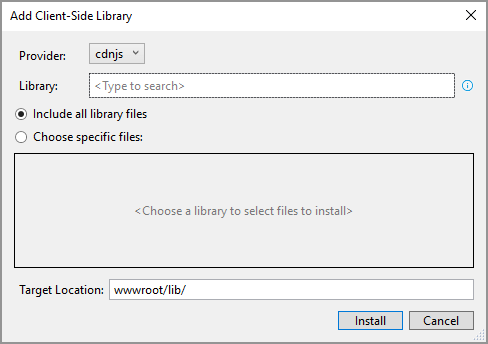
Table of Contents (4 min read)
When migrating legacy ASP.NET MVC 5 codebases to modern ASP.NET Core (or .NET 8 / .NET 9), one of the first breaking changes developers encounter is the complete removal of the @Ajax HTML helper family (@Ajax.BeginForm, @Ajax.ActionLink).
In ASP.NET Core, Microsoft retired the server-side @Ajax helper methods in favor of standard semantic HTML5 elements decorated with declarative data-ajax-* attributes, powered by the jquery.unobtrusive-ajax client library.
Here is how the transition works, how to configure the client scripts, and how this technique compares to modern lightweight patterns like htmx and native fetch() in .NET 9 Minimal APIs.
Installing and Referencing the Client Scripts
To activate unobtrusive AJAX behavior, the browser requires two client-side scripts:
jquery(v3.5+)jquery-ajax-unobtrusive(v3.2.6+)
You can install these via LibMan into wwwroot/lib/ or reference them via cdnjs in your _Layout.cshtml:
<!-- In Views/Shared/_Layout.cshtml or Pages/Shared/_Layout.cshtml -->
<script src="https://cdnjs.cloudflare.com/ajax/libs/jquery/3.7.1/jquery.min.js"></script>
<script src="https://cdnjs.cloudflare.com/ajax/libs/jquery-ajax-unobtrusive/3.2.6/jquery.unobtrusive-ajax.min.js"></script>
Mapping Reference: Legacy @Ajax Helper vs Modern data-ajax-* Attributes
In legacy MVC, helper options were configured via an AjaxOptions object. In ASP.NET Core, each option maps directly to an HTML5 data attribute:
| Legacy AjaxOption | ASP.NET Core HTML5 Attribute | Description |
|---|---|---|
Confirm |
data-ajax-confirm="Are you sure?" |
Prompts browser confirm dialog before sending request. |
HttpMethod |
data-ajax-method="POST" |
HTTP method (GET, POST, PUT, DELETE). |
InsertionMode |
data-ajax-mode="replace" |
Insertion mode: replace, before, after, or replace-with. |
UpdateTargetId |
data-ajax-update="#result-panel" |
CSS selector or ID of the DOM element receiving the response. |
Url |
data-ajax-url="/api/comments" |
Destination URL (or use standard action / href). |
LoadingElementId |
data-ajax-loading="#spinner" |
Element ID shown during request and hidden upon completion. |
LoadingElementDuration |
data-ajax-loading-duration="200" |
Animation duration in milliseconds for the loading element. |
OnBegin |
data-ajax-begin="onSearchBegin" |
JavaScript callback function executed before the request starts. |
OnSuccess |
data-ajax-success="onSearchSuccess" |
JavaScript callback function executed upon successful response (HTTP 200). |
OnFailure |
data-ajax-failure="onSearchFailure" |
JavaScript callback function executed upon error response (HTTP 4xx / 5xx). |
OnComplete |
data-ajax-complete="onSearchComplete" |
JavaScript callback function executed when the request terminates. |
Complete Working Example: Asynchronous Search Form
Here is a full Razor markup example demonstrating asynchronous form submission with partial view rendering, loading indicator, and client-side error handling:
<!-- Search Form with Unobtrusive Ajax -->
<form asp-controller="Search"
      asp-action="FilterArticles"
      method="post"
      data-ajax="true"
      data-ajax-method="POST"
      data-ajax-mode="replace"
      data-ajax-update="#articles-grid"
      data-ajax-loading="#search-spinner"
      data-ajax-failure="handleSearchError"
      class="search-form">

    <div class="input-group">
        <input type="text" name="query" placeholder="Search field notes..." class="form-control" />
        <button type="submit" class="btn btn-primary">Filter</button>
    </div>

    <!-- Loading Indicator -->
    <div id="search-spinner" style="display: none; margin-top: 0.5rem;">
        <span class="spinner-border spinner-border-sm" role="status"></span>
        <span>Querying PostgreSQL index...</span>
    </div>
</form>

<!-- Target Container Updated via AJAX -->
<div id="articles-grid">
    <p class="text-muted">Enter a search term above to filter results asynchronously.</p>
</div>

<script>
    function handleSearchError(xhr, status, error) {
        console.error("Search AJAX request failed:", error);
        document.getElementById("articles-grid").innerHTML =
            '<div class="alert alert-danger">Unable to load results. Please try again.</div>';
    }
</script>
Corresponding ASP.NET Core Controller Action
The backend action renders and returns a standard partial view:
[HttpPost]
public async Task<IActionResult> FilterArticles([FromForm] string query)
{
    var results = await _articleService.SearchAsync(query);
    return PartialView("_ArticleCardsPartial", results);
}
Modern Paradigm Shift: When to Consider htmx or Native fetch()
While Unobtrusive AJAX remains a reliable bridge for legacy migration, modern .NET 9 architectures increasingly favor zero-jQuery alternatives:
htmx: Delivers the exact same declarative HTML-swapping experience without requiring jQuery:<form hx-post="/api/articles/search" hx-target="#articles-grid" hx-swap="outerHTML"> <input type="text" name="query" /> <button type="submit">Search</button> </form>- Native JavaScript
fetch()with Minimal APIs: In modern .NET 9 Minimal APIs, endpoints return lightweight JSON payloads that can be consumed directly with standard browser APIs:const res = await fetch(`/api/search?q=${encodeURIComponent(query)}`); const data = await res.json();
For existing MVC codebases, however, jquery.unobtrusive-ajax provides a dependable, drop-in replacement that eliminates the need for full architectural rewrites.
Discussion (0)
Community Guidelines EnforcedNo community comments yet. Be the first to share your thoughts!
Join the Community Discussion
Sign in or create an account to share observations, tuning setups, and connect with other makers.