Creality K1 & Bambu Lab P1S: 6 Months of High-Speed PETG & Gridfinity Fabrication
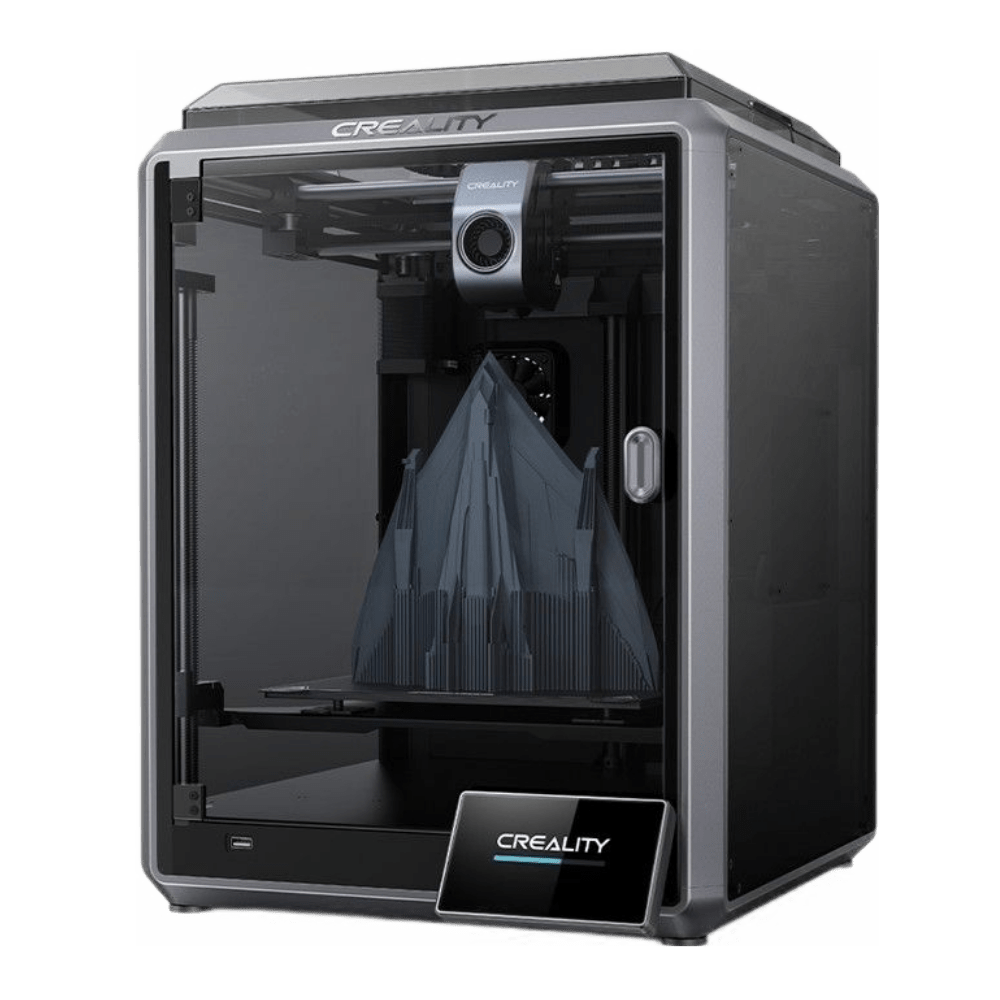
Table of Contents (6 min read)
Six Months with the Creality K1 & Bambu Lab P1S: Workshop Engineering Review
Six months ago, the Creality K1 joined my workshop bench as a dedicated CoreXY workhorse. Between fabricating custom 1U rackmount switch brackets for the Dell PowerEdge T20 homelab, printing modular Fusion 360 Gridfinity organizer bins, and tuning high-flow toolheads, the printer has run almost continuously.
Operating the Creality K1 alongside our Bambu Lab P1S has provided a fascinating comparison of high-speed desktop 3D printing. While the Bambu Lab P1S represents the pinnacle of out-of-the-box appliance reliability, the Creality K1—once rooted and running open Klipper—delivers unmatched tinkerability, raw throughput, and open-source flexibility.
1. Unboxing, Hardware Platform & First Impressions
The transition from older Cartesian bedslingers (like standard Ender 3s) to an enclosed CoreXY architecture is transformative:
| Machine Metric | Creality K1 (Rooted) | Bambu Lab P1S |
|---|---|---|
| Motion Kinematics | CoreXY (Dual Gantry Steppers) | CoreXY (Carbon Rods) |
| Maximum Acceleration | 20,000 mm/s² | 20,000 mm/s² |
| Hotend Temperature | Up to 300°C (All-Metal Ceramic) | Up to 300°C (Hardened Steel) |
| Build Volume | 220 × 220 × 250 mm | 256 × 256 × 256 mm |
| Firmware Ecosystem | Open Klipper / Moonraker / Fluidd | Proprietary Closed Bambu OS |
| Filament Ecosystem | Open 1kg Spools & Dryboxes | AMS 4-Color Multi-Material |
Out of the box, Creality did their homework on the mechanical frame. The die-cast aluminum alloy frame is rigid, preventing gantry twist during rapid acceleration changes. The enclosed build chamber keeps ambient temperatures stable—an absolute requirement when printing structural filaments.
2. Rooting the Creality K1: Unlocking Full Klipper Power
The real turning point for the Creality K1 came when Creality officially released root SSH access for the onboard Linux system. By default, the factory Creality OS abstracts away the Klipper configuration files behind a simplified touchscreen UI.
Gaining root access allowed us to install Moonraker, Fluidd, and Mainsail, transforming the K1 into an open, fully inspectable machine:
Installation via the Guilouz Helper Script
# Connect via SSH to Creality K1
ssh root@192.168.70.45
# Default root password provided in Creality settings menu

# Execute open helper script to install Moonraker, Fluidd, and KAMP
sh -c "$(wget --no-check-certificate -qO - https://raw.githubusercontent.com/Guilouz/Creality-Helper-Script/main/scripts/install.sh)"
Key Tuning Upgrades Unlocked
- KAMP (Klipper Adaptive Meshing & Purging): Instead of probing the entire 220×220 mm bed before every print, KAMP probes only the small bounding box where the model will actually be printed, slashing print start times from 6 minutes down to 90 seconds.
- Native Input Shaping Resonance Graphs: Inspecting the raw accelerometer graphs revealed a sharp mechanical resonance peak around 58 Hz on the X-axis. Setting
shaper_type_x: mzvcompletely eliminated ringing artifacts at 300 mm/s. - OrcaSlicer Native Direct Wi-Fi Upload: Printing directly from OrcaSlicer via Moonraker bypasses cloud middleware entirely, sending G-code directly over our private 10GbE network.
3. Filament Engineering: PLA vs. High-Speed PETG
A 3D printer is only as good as the polymers you feed it. In our workshop, materials are strictly partitioned by functional requirements:
Standard PLA
PLA remains the undisputed champion for visual prototypes, decorative prints, and rapid form-factor validation. With high chamber fan speeds and the top glass lid propped open to prevent heat creep in the extruder, the K1 prints PLA at 300–400 mm/s with crisp details and minimal layer visibility.
High-Speed PETG (Our Primary Engineering Material)
While PLA is easy, it fails catastrophically under server rack ambient temperatures (softening at 55°C) and creeps under mechanical fastener torque.
PETG is our primary functional material. With an 80°C glass transition temperature (\(T_g\)) and exceptional interlayer fusion, PETG parts withstand continuous mechanical stress.
Slicer Tuning Parameters for PETG on K1 & P1S
- Extruder Temperature: 245°C – 255°C (Ensures complete polymer melt at volumetric flows > 20 mm³/s).
- Bed Temperature: 75°C on textured PEI powder-coated sheet.
- Part Cooling Fan: 40% maximum (excessive cooling causes PETG layer delamination).
- Retraction: 0.6 mm at 45 mm/s on direct-drive extruder.
- Pressure Advance:
0.042dialed in via Klipper PA test.
4. Workshop Fabrication: Custom Fusion 360 Gridfinity Designs
One of the greatest benefits of having both the Creality K1 and the Bambu Lab P1S in the workshop is manufacturing our own custom workshop storage ecosystem based on Zack Freedman's Gridfinity standard.
Using Autodesk Fusion 360, we designed parametric 42mm modular organization bins tailored to our homelab engineering workflow:
┌──────────────────────────────────────────────┐
│  Parametric 1x3 Gridfinity Caliper Holder    │
│  - 0.15mm tolerance for digital calipers     │
│  - 4x 6x2mm neodymium base magnet recesses   │
│  - 5-wall PETG perimeter for drop-resistance │
└──────────────────────────────────────────────┘
Fusion 360 Modeling Workflow
- Base Grid Parameters: Define base dimension parameters (
GridUnit = 42mm,Tolerance = 0.5mm,CornerRadius = 3.75mm). - Stacking Lip Profile: Extrude the standardized 45-degree chamfered stacking lip to allow modular stacking in tool drawers.
- Custom Contoured Cutouts: Import step files of our Mitutoyo calipers, M3/M4 heat-set insert assortment boxes, and server cage nuts, performing a boolean subtract with 0.3mm tolerance offsets.
Both the K1 and P1S pump out these Gridfinity bins with absolute dimensional accuracy, allowing us to keep hundreds of screws, hex keys, and network termination jacks organized.
5. The 6-Month Verdict
Six months in, the Creality K1 has proven itself to be a capable, reliable, and high-performance manufacturing machine. While early firmware revisions had minor rough edges, gaining root SSH access and integrating Moonraker and OrcaSlicer turned it into a true powerhouse.
Paired alongside the Bambu Lab P1S, our workshop has a continuous manufacturing line capable of producing high-temperature PETG homelab brackets, custom Gridfinity organizers, and rapid prototypes on demand. If you are willing to spend an hour unlocking Klipper, the K1 offers unmatched value for maker engineers.
Discussion (0)
Community Guidelines EnforcedNo community comments yet. Be the first to share your thoughts!
Join the Community Discussion
Sign in or create an account to share observations, tuning setups, and connect with other makers.